Most candidates think the PL-300 is a Power BI features test. It isn't. The exam is testing your ability to make the right modeling and design decisions under stated constraints, and that's a different skill entirely from knowing where to click. Memorizing every DAX function won't save you if you can't decide which one belongs in a given scenario.
TL;DR
- 40–60 questions, 100 minutes, passing score 700/1000. Budget your time, that's roughly 2 minutes per question at most.
- Four domains, three of them equally weighted at 25–30%. Prepare the Data, Model the Data, and Visualize and Analyze the Data each carry identical weight. Deploy and Maintain is smaller but routinely underestimated.
- DAX and data modeling are the hardest parts. CALCULATE, time intelligence, and row-level security generate more wrong answers than any other topic area.
- The exam rewards understanding, not recall checklists. Some candidates report that scenario-based questions require applying concepts to new situations, not reciting steps.
- A free Practice Assessment exists on Microsoft Learn. Use it before you book. Aim for consistent 80–85% before scheduling.
- Certification is valid for one year. Renewal is free: a short online assessment on Microsoft Learn.
- Cost is $165 USD with discounts available for students and educators.
What the PL-300 Is Actually Testing
The PL-300 measures whether you can function as a competent Power BI practitioner, from connecting to data all the way through securing and publishing a finished report. The official Microsoft study guide frames this as four phases of an analyst's workflow: prepare, model, visualize, and deploy.
What the domain list doesn't tell you: the exam's hardest questions aren't about knowing facts. They're about choosing between two plausible approaches when a constraint makes one of them wrong. Should you use a calculated column or a measure? DirectQuery or Import? Row-level security at the model level or object-level security? The exam puts you in scenarios and asks you to pick. That's the real test.
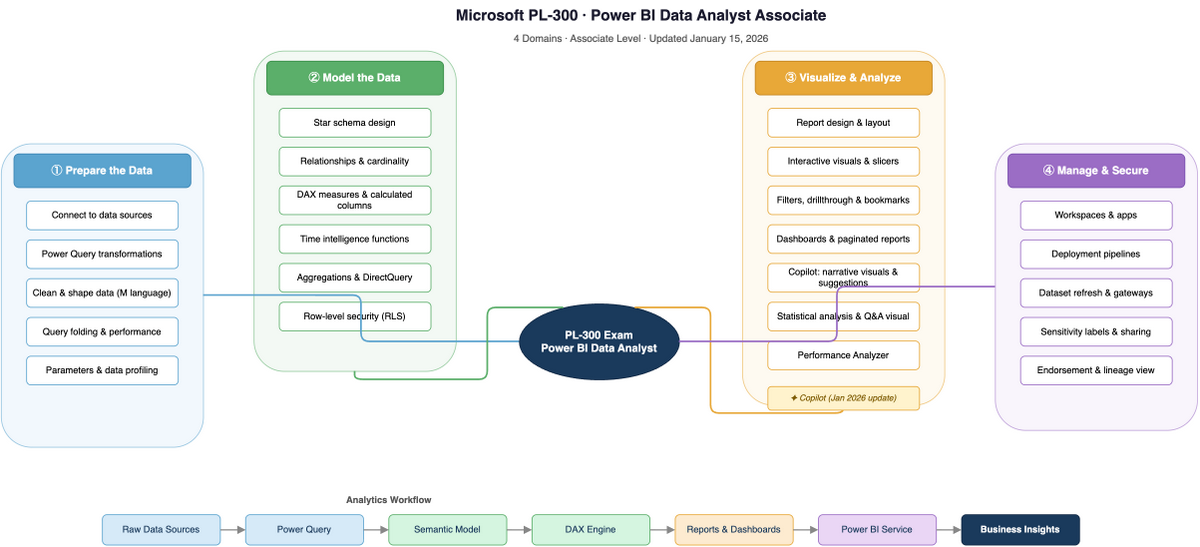
Plenty of candidates treat the exam like a vocabulary quiz, and they tend to struggle when the question involves two options that both seem technically correct. The one that's "right" depends on reading what the scenario is optimizing for: performance, scalability, maintainability, or data freshness. Build that instinct in practice, and the exam becomes navigable.
Myths and Realities
Myth: You Need to Memorize Every DAX Function
Reality: You need to understand what a small set of functions actually do. CALCULATE, FILTER, ALL, RELATED, and the core time intelligence functions (DATEADD, DATESYTD, TOTALYTD) cover the majority of what the exam tests. Advanced DAX is genuinely on the exam, some candidates report it's the section that catches them off guard, but the problem isn't obscure syntax. The problem is not understanding filter context. Learn filter context first, and the function names follow.
Myth: Power Query Is Easy, So Domain 1 Is Easy
Reality: Power Query mechanics are familiar to most analysts, which is why candidates feel confident here. That confidence is mostly earned. But the exam tests specific decisions: when to enable query folding, how to handle null values without breaking downstream calculations, when to use parameters versus hard-coded steps. The mechanics aren't hard. The tradeoffs require thought.
Myth: The Deploy and Maintain Domain Is Just Admin Stuff
Reality: At 15–20% of the exam, it's the smallest domain, but it contains row-level security, object-level security, and sensitivity labels. These topics are both conceptually distinct and testable in scenario form. Community threads consistently identify this domain as the one people wish they'd studied more. If you've spent most of your time in Power BI Desktop and very little in the Power BI Service, you'll feel this.
Myth: Taking Practice Exams Repeatedly Is the Best Prep Strategy
Reality: Limited community data suggests that memorizing practice exam questions is explicitly not a winning strategy. What passes the exam is understanding the concepts well enough to answer a question you've never seen before. Practice questions are useful for identifying gaps, they're not useful for gap-filling by repetition.
Exam at a Glance
| Item | Detail |
|---|---|
| Cost | $165 USD (discounts for students and educators) |
| Duration | 100 minutes |
| Questions | 40–60 (multiple choice, drag-and-drop, case studies) |
| Passing Score | 700/1000 |
| Format | Multiple choice, drag-and-drop, case studies |
| Validity | 1 year (free renewal assessment on Microsoft Learn) |
| Testing | Online proctored / Test center (Pearson VUE) |
| Retake Policy | Standard Microsoft certification retake policy applies |
| Skills Updated | April 20, 2026 |
The question format mix matters more than the count. Drag-and-drop questions test procedural knowledge, you're ordering steps or matching options, and they're harder to fake with surface-level familiarity. Case study questions present a business scenario and then ask several related questions from it. If you read the case study carefully, the scenario itself often contains the constraints that eliminate wrong answers.
One note on duration: a separate source reported 120 minutes, which conflicts with the 100-minute figure cited across the official and primary community sources. The 100-minute figure is treated as authoritative here, but check the official Microsoft certification page before you book.
Some candidates report the exam allows access to documentation during the test. Microsoft hasn't confirmed this in official documentation, so treat it as unverified. Prepare to work without documentation access and you won't be caught short either way.
Who Should Take This Exam
The PL-300 is aimed at data analysts and BI developers who work in Power BI regularly and want a credential that validates their skills. If your day-to-day involves building reports, shaping data in Power Query, writing DAX measures, and publishing dashboards for business stakeholders, this exam is testing exactly what you do.
If you're in a role that uses Power BI occasionally but isn't analyst-focused, a data engineer who builds pipelines, a developer who embeds Power BI in apps, the exam's depth in report design and DAX modeling may require more prep than you'd expect. The credential is specifically scoped to the analyst workflow, not Power BI administration or development in the broader sense.
If you're early in your analytics career, the PL-300 is achievable, but give yourself the full preparation window. The modeling and security domains assume familiarity with concepts like star schema design and access control that take time to internalize properly. The certification is listed at the Associate level for a reason.
Domain Breakdown
Domain 1, Prepare the Data (28%)28%
This domain covers the full data ingestion workflow: connecting to sources, profiling data quality, applying transformations, and loading a clean dataset into the model. Power Query is the central tool throughout.
The exam tests specific decisions within this workflow. Choosing between Import, DirectQuery, and Direct Lake isn't a question of preference, each has defined tradeoffs around performance, data freshness, and licensing. If a scenario states that data must be as current as possible, that's a signal. If it states that the dataset is large and query performance is the priority, that's a different signal. The exam expects you to recognize them.
Query folding is tested deliberately. It's not enough to know that query folding exists, you need to know which transformation steps break it and why that matters for performance. Group and aggregate, pivot/unpivot, and converting semi-structured data to tables are all explicitly in scope.
Candidates consistently feel most confident in this domain going into the exam. That confidence is usually justified, but don't underestimate the transformation-decision questions. They look familiar and can hide specifics that eliminate the wrong option.
Recall checklist for this domain:
- Import vs. DirectQuery vs. Direct Lake: when each is appropriate
- Steps that break query folding (custom functions, merging incompatible sources)
- Column data type selection and downstream implications
- Handling null values, errors, and data quality issues in Power Query
- Parameters: creation, use, and modification
Domain 2, Model the Data (28%)28%
This is the hardest domain on the exam. The official scope is broad, star schema design, relationships, DAX, date tables, security, and every topic in it is testable at a level of depth that catches candidates who've only used Power BI in surface-level ways.
Star schema design means knowing the difference between fact and dimension tables, configuring cardinality correctly, and understanding cross-filter direction. These aren't abstract concepts. The exam will describe a data model and ask you to identify what's wrong with it, or which relationship configuration matches a stated reporting requirement.
DAX is where most candidates lose points. Actually, that's not quite right, it's more precise to say DAX filter context is where candidates lose points. CALCULATE and FILTER are the functions the exam orbits around. Understanding that CALCULATE modifies filter context, and what ALL does to remove it, is more useful than memorizing syntax. Time intelligence (DATEADD, DATESYTD, TOTALYTD, and their relatives) appears on the exam and requires a working date table to function, know how to create one, mark it, and configure it correctly.
Row-level security at the model level is in scope here. Static RLS is straightforward; dynamic RLS using USERPRINCIPALNAME() is less familiar to most candidates and more likely to show up in a scenario question.
Recall checklist for this domain:
- Star schema: fact tables, dimension tables, grain
- Relationship cardinality (one-to-many, many-to-many) and cross-filter direction
- Calculated columns vs. measures: when to use each
- CALCULATE: what it does to filter context
- ALL, FILTER, RELATED: specific use cases
- Date table requirements and time intelligence function prerequisites
- Static RLS vs. dynamic RLS with USERPRINCIPALNAME()
Domain 3, Visualize and Analyze the Data (28%)28%
The visualization domain covers report design, interactivity features, and analytics capabilities. Chart selection, conditional formatting, and KPI indicators are in scope and fairly straightforward. The more specific content, bookmarks, drillthrough, and tooltips, requires hands-on familiarity rather than just reading about it.
Some candidates report that AI visuals catch them off guard. Key Influencers, Decomposition Tree, and Q&A visuals are explicitly in scope, and candidates who've spent most of their time building standard bar charts and line graphs may not have used them in practice. These visuals have specific configuration requirements and specific use cases, the exam tests whether you know when to use them, not just that they exist.
The analytics pane (trend lines, forecast, error bars, percentile lines) is testable. Paginated reports appear in the domain scope too, and they're conceptually distinct from standard Power BI reports, different use cases, different layout logic.
What shows up repeatedly in community threads is that bookmarks and drillthrough are frequently tested. Both require understanding a sequence of steps: set up a bookmark state, configure a drillthrough page, pass filter context correctly. If you've only read about these features, practice building one from scratch.
Recall checklist for this domain:
- Drillthrough: setup, filter context, back button behavior
- Bookmarks: capturing visual state, using for navigation
- Key Influencers: what it analyzes, what data types it requires
- Decomposition Tree: hierarchical breakdown, how users interact with it
- Q&A visual: natural language setup, custom synonyms
- Analytics pane features: forecast, trend lines, percentile lines
- Paginated reports: when to use vs. standard reports
Domain 4, Deploy and Maintain Assets (18%)18%
Smaller by weight, consequential in practice. This domain covers the Power BI Service side of the workflow: publishing to workspaces, configuring apps, setting up scheduled refresh, and securing content through RLS, OLS, and sensitivity labels.
The security features here are distinct from the model-level RLS in Domain 2. Object-level security restricts access to specific tables or columns. Sensitivity labels integrate with Microsoft Purview to classify and protect data. Both topics are testable in scenarios that describe an access requirement and ask which security mechanism addresses it.
Scheduled refresh configuration sounds administrative and straightforward, and mostly it is, but the exam tests edge cases: what happens when a data source uses DirectQuery vs. Import, what gateway configuration is required for on-premises sources, what happens when credentials expire. These are practical details that candidates who've only published to the cloud without on-premises sources may not have encountered.
Recall checklist for this domain:
- Workspace roles and what each can do
- RLS at the service level vs. the model level
- OLS: restricting column or table access
- Sensitivity labels: purpose, how they're applied, integration with Purview
- Scheduled refresh: requirements, gateway for on-premises, troubleshooting
- Power BI apps: creation, distribution, update workflow
Domains Ranked by Candidate Difficulty
Based on what community threads and pass reports describe, here's the order from hardest to easiest:
- Model the Data, DAX filter context and dynamic RLS are genuinely difficult. Most candidates underestimate the depth required.
- Deploy and Maintain Assets, Small domain, but security topics (RLS, OLS, sensitivity labels) are unfamiliar to candidates who work primarily in Desktop.
- Visualize and Analyze the Data, Mostly manageable, but AI visuals and paginated reports surprise candidates who haven't used them hands-on.
- Prepare the Data, The most familiar territory for most analysts. Not trivial, but the baseline confidence here is usually earned.
If you're short on time: go deep on Domain 2 first, then shore up Domain 4.
Where Candidates Lose Points
Not understanding filter context. This isn't a DAX problem. It's a conceptual problem. If you don't understand how CALCULATE modifies the filter context inherited from a visual, you'll get CALCULATE questions wrong even if you've memorized the syntax. Start with the concept, then the function.
Skipping the Power BI Service. Most prep time goes into Power BI Desktop. The Deploy and Maintain domain tests the Service, workspaces, apps, security configuration, refresh settings. If you haven't published to a workspace, configured RLS in the Service, or set up a scheduled refresh, you're going into the exam with a blind spot. If your experience is mostly in Desktop, then spend dedicated time in the Service before you book.
Underestimating AI visuals. Some candidates report that Key Influencers and Decomposition Tree appear on the exam and feel unfamiliar. These aren't trick questions, they test whether you know what the visual does and when to use it. Spend an hour building each one in Desktop. That's usually enough.
Treating practice questions as the product. Limited community data suggests this explicitly: understanding concepts matters more than recognizing a question you've seen before. Practice questions diagnose gaps. They don't fill them. When you get a question wrong, study the concept, not the answer.
Misreading scenario constraints. The exam's scenario questions contain the information needed to answer correctly. "Data must refresh in real time" eliminates Import. "The dataset contains 50 million rows" changes the modeling conversation. Read every constraint in the scenario before looking at the options.
How to Prepare
Start with the Official Study Guide
The official PL-300 study guide is the authoritative list of what's in scope. Skim it before anything else. Use the domain weights to decide where to invest time, three domains at 25–30% each, one at 15–20%. The skills outline is granular enough to function as a study checklist: if you can honestly say you understand each item, you're ready to test.
The official Microsoft Learn learning paths cover the full PL-300 scope at no cost. They're comprehensive and accurate. They're also easier than the real exam, so finishing them isn't a proxy for readiness.
Build Things in Power BI Desktop
There's a version of this exam you can fail having read everything and built nothing. The questions about bookmarks, drillthrough, RLS configuration, and query folding are easier to reason through if you've done the thing, not just read about it. Build a star schema from scratch. Write a CALCULATE measure that uses FILTER. Set up dynamic RLS with USERPRINCIPALNAME(). Configure a drillthrough page. These are an hour of practice each and they anchor the conceptual knowledge.
Use Practice Questions to Find Gaps
CertCompanion has practice questions with detailed explanations for the PL-300 at /exams/microsoft-power-bi-data-analyst-pl-300. Start with a diagnostic session before you've done heavy studying, what you get wrong tells you where to invest. Aim for consistent 80–85% before you book the exam. The official free Practice Assessment on Microsoft Learn is also worth completing: it's shorter but uses the real question style and scores your result by domain, which shows exactly where your gaps are.
For Microsoft's broader exam and certification catalog, the Microsoft provider hub has the full picture of where PL-300 sits in the credential hierarchy.
Official Tools Worth Using
- Microsoft Learn free Practice Assessment, official questions, domain-level scoring, free.
- Exam sandbox, familiarize yourself with the exam interface before you sit the real thing. It's not nothing.
- Official study guide, use as a checklist, not reading material.
- Microsoft Learn learning paths, free, comprehensive, and accurate. Just don't mistake completion for readiness.
Study Timeline by Background
| Background | Estimated Hours | What Drives the Difference |
|---|---|---|
| Experienced Power BI practitioners (daily users, comfortable with DAX) | 20–35 hours | Focus on security features, OLS, and scenario-based question practice. Gaps are usually in Deploy and Maintain. |
| Intermediate analysts (regular Power BI use, limited DAX and Service experience) | Around 40 hours | Limited community data suggests this figure, drawn from a structured 4-week plan. Modeling and security domains need deliberate investment. |
| Beginners to Power BI or BI analytics broadly | 60–80 hours or more | Build Power BI fundamentals first. The exam assumes working knowledge of analytical concepts, not just Power BI mechanics. |
These figures are estimates based on limited community data, actual study time varies significantly by background and how efficiently you identify and close gaps. The 40-hour figure for intermediate candidates is cited by one source and should be treated as directional rather than definitive.
On Exam Day
Use the exam sandbox before the real thing. Microsoft provides an environment at aka.ms/examdemo that replicates the exam interface. Use it once. The interface isn't complicated, but knowing where to flag questions and how to navigate between sections removes one variable on exam day.
Read scenario questions completely before looking at the options. Case study questions are information-dense. The constraint that eliminates three of the four options is often in the middle of the second paragraph. Options first is a trap.
Allocate time deliberately. At 100 minutes for up to 60 questions, you have less than 2 minutes per question on average. Straightforward multiple-choice questions should take under a minute. Case study questions need more. Flag and move, don't stall on a question when you're uncertain. Come back to it.
Request any accommodations well in advance. Extra time and assistive devices require advance approval through the Microsoft certification accommodations process. Don't assume you can request them on the day.
Some community members report that the exam allows access to documentation during the test. This is not confirmed by official sources. Don't plan around it. If it's available, consider it a bonus.
After You Pass
The PL-300 credential is valid for one year. Renewal is a free assessment on Microsoft Learn, shorter than the original exam, taken online, no fee. Microsoft sends renewal reminders before the expiration date.
For career context: Power BI remains one of the most widely adopted business intelligence platforms. The roles that list this certification most commonly are Data Analyst, Business Analyst, and Power BI Developer. Demand for Power BI skills is consistent and growing, particularly as organizations migrate to or standardize on the Microsoft Fabric stack.
On the question of what comes next: the PL-900 (Power Platform Fundamentals) is sometimes taken before PL-300 and provides useful context if your organization is deeply invested in the Microsoft ecosystem. Microsoft Fabric certifications are the natural progression for analysts who want to grow into enterprise-scale data workflows, Fabric is the direction Microsoft is moving, and PL-300 knowledge transfers well into it.
One note of caution: the DP-500 (Azure Enterprise Data Analyst Associate) has been cited as a follow-on certification in community resources, but per one community report it expired April 30, 2024. Verify current availability directly on the Microsoft certification page before investing prep time in it.
Frequently Asked Questions
Is the PL-300 hard? It's a genuine intermediate-level exam. The domain breadth is manageable, four domains, well-documented skills lists, official learning paths that cover the content. The difficulty comes from the scenario-based question style: two options can both be technically valid, and the right answer depends on reading what the scenario is optimizing for. Candidates with strong DAX and modeling experience tend to find it straightforward. Candidates who've mostly built reports without thinking about the underlying model tend to struggle.
How many hours do I need to study? Limited community data suggests around 40 hours for intermediate-level analysts following a structured plan. Experienced Power BI practitioners who work with DAX and the Service regularly may need 20–35 hours, focused on gaps in security features and scenario practice. Complete beginners should budget more, 60–80 hours or more, and consider building foundational BI knowledge before starting formal PL-300 prep. These are directional estimates, not guarantees.
Does the PL-300 expire? Yes. The certification is valid for one year. Renewal is a free online assessment on Microsoft Learn, no retake of the full exam required. Microsoft will notify you before the expiration date.
Do I need prerequisites? There are no mandatory prerequisites. Microsoft recommends practical experience with Power BI and familiarity with data analysis concepts. The PL-900 (Power Platform Fundamentals) is sometimes taken first but isn't required. If you've never built a Power BI report, you're not ready for PL-300 yet, get some hands-on experience first.
Is the PL-300 worth it for my career? It's the most recognized Power BI credential and aligns directly with the Data Analyst, Business Analyst, and Power BI Developer roles. If your work involves Power BI regularly, the cert validates skills you already use. If Power BI is a minor part of your role, the PL-300 is probably not the highest-return certification investment available to you.
What if I fail? Standard Microsoft certification retake policies apply. If you fail, use the domain-level score report to understand where you lost points, and direct your study time there before rescheduling. The score report is specific enough to guide a targeted second attempt.
Can I use documentation during the exam? Some candidates report the exam allows access to documentation. Official Microsoft sources don't confirm this. Prepare assuming you'll need to work from memory. If documentation turns out to be available, it's a bonus, not a substitute for knowing the material.
What's the difference between a calculated column and a measure in DAX? Calculated columns are computed row-by-row at data refresh and stored in the model. Measures are computed at query time, responding to the filter context of a report visual. The exam tests when to use each: measures for aggregations that vary by visual context, calculated columns when you need a value available as a filter or row-level attribute. If you can explain why COUNTROWS works differently as a measure vs. a calculated column, you understand the distinction at the level the exam requires.
What It Actually Takes
The PL-300 is a well-scoped exam. Four domains, an official skills list that tells you exactly what's testable, free official practice tools, and a clear renewal path. There's nothing mysterious about it. What catches candidates isn't the breadth, it's the depth in two areas: DAX filter context and the Power BI Service security model. Get those right, build hands-on familiarity with the features that show up in scenario questions, and use practice questions diagnostically rather than as a memorization shortcut.
The exam rewards analysts who've actually used Power BI to solve problems, not just those who've read about it. If that's you, the prep mostly involves filling specific gaps, not starting from scratch.
Start with a free diagnostic on CertCompanion's PL-300 practice questions to find out exactly where your gaps are before you open a single study guide.