Most candidates already use GitHub Actions at work. That's the trap. The exam doesn't test whether you can write a workflow, it tests whether you understand exactly what each line does, what the correct scope is, and what happens when enterprise policies conflict. A candidate who passed all five GitHub certifications called it the toughest of the five. That's the exam you're preparing for.
TL;DR
- Cost: $99 USD (regional variations apply)
- Time: 100 minutes, approximately 40–60 questions per community reports
- Passing score: 700/1000 (scaled)
- Format: Multiple choice, multiple response, drag-and-drop, and YAML completion, not just standard MCQ
- Validity: 1–2 years (verify current renewal terms on Microsoft Learn before booking)
- Biggest surprise: Microsoft Learn documentation is not accessible during the exam. Full recall required.
- The January 2026 update significantly revised the objectives. Any guide written before that date is unreliable.
What this exam is actually testing
The GH-200 is not testing whether you can build a CI pipeline. If you've shipped GitHub Actions workflows, you already know how to do that. What it tests is whether you understand the system precisely enough to reason about it under specific, constrained scenarios.
The question style rewards candidates who can read a 20-line YAML snippet and catch the one line that changes the whole behavior. It rewards candidates who understand why GITHUB_TOKEN and a personal access token behave differently in a given context, not just that they're different. It rewards candidates who understand what happens to GitHub Actions governance at the organization and enterprise level, a layer most individual contributors never touch.
Think of it like the difference between knowing how to drive and knowing how a car works. Day-to-day GitHub Actions users know how to drive. This exam asks about the engine.
Exam at a glance
| Item | Value |
|---|---|
| Cost | $99 USD (regional variations apply) |
| Duration | 100 minutes |
| Questions | Approximately 40–60 per community reports |
| Passing Score | 700/1000 (scaled score) |
| Format | Multiple choice, multiple response, drag-and-drop, active-screen/YAML completion |
| Validity | 1–2 years (verify on official Microsoft Learn page) |
| Testing | Online proctored / Test center (Pearson VUE) |
| Retake Policy | 24 hours between attempts |
| Current Version | January 2026 (significant revision) |
The question format is worth dwelling on. The exam includes interactive items, drag-and-drop and YAML completion questions, alongside standard multiple choice. This is not a trivia quiz you can power through with pattern recognition. Some questions will show you a partial workflow and ask you to complete or fix it. That requires recall of exact syntax, not general familiarity.
With approximately 40–60 questions in 100 minutes, you have roughly 2 minutes per question. That's enough time if you're prepared, tight if you're not. Flag uncertain questions and come back; spending 6 minutes on a single YAML completion scenario will cost you elsewhere.
One more thing about scoring: the 700/1000 threshold is a scaled score, not 70% of raw questions. The scaling accounts for question difficulty, so you can't predict your result simply by tracking how many answers you felt confident about.
Who should take this exam?
This is an intermediate-level cert for people who are already working with GitHub Actions regularly. The official Microsoft Learn page targets DevOps engineers, software developers, and administrators who use GitHub Actions in production environments.
If you've been writing workflows for at least several months and have started dealing with more complex scenarios, reusable workflows, secrets management, matrix strategies, or runner configuration, you're in the right zone to start preparing. Plenty of community sources suggest 6–12 months of hands-on GitHub Actions or CI/CD experience before attempting, though that's a conservative estimate from limited data rather than an official prerequisite.
If your only GitHub Actions experience is copy-pasting workflow files and tweaking them until they work, this exam will be harder than expected. The domains that trip most people sit above the workflow level: enterprise policy, organization-level governance, and security permissions. If you haven't worked in those layers, you'll need to learn them from scratch, not just refresh them.
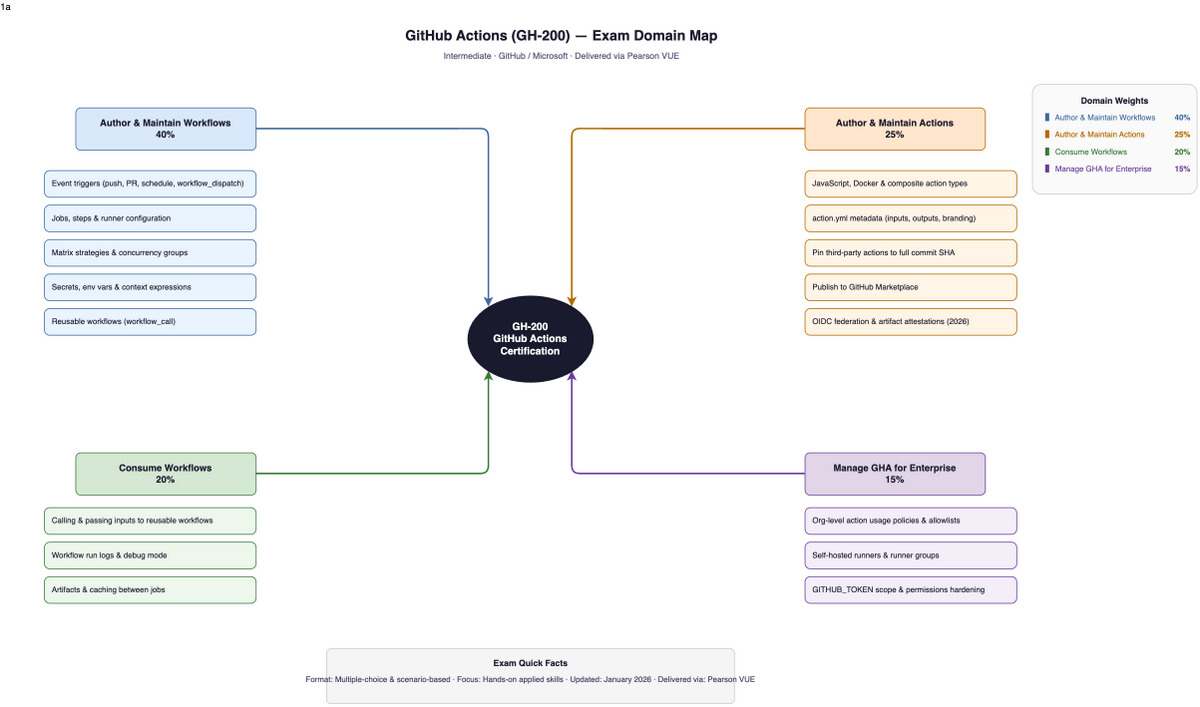
The five domains
Domain 1: Author and Manage Workflows (23%)23%
This is the core workflow authoring domain, tied for the highest weight on the exam. YAML structure, trigger events, job dependencies, matrix strategies, reusable workflows, concurrency groups, and caching all live here.
The parts that generate the most questions aren't the simple ones. Reusable workflows via workflow_call are consistently flagged as tricky, specifically the way inputs and secrets are declared and passed. The syntax is unforgiving. An input declared one way in the called workflow and referenced a different way in the caller produces a specific, predictable failure, and the exam will test whether you know exactly what that failure looks like.
Matrix strategy edge cases are another area where candidates lose points. The difference between include and exclude in a matrix, how fail-fast interacts with parallel jobs, and what max-parallel actually controls are all fair game. Watch out for YAML indentation in active-screen questions: a single level of indentation can change whether a step runs as part of a job or triggers a different behavior entirely. Small syntax details matter. Full stop.
YAML anchors and aliases also appear. Most developers don't use them daily, but they're in scope. Know what &anchor and *alias do and when they'd be used.
Domain 2: Consume and Troubleshoot Workflows (18%)18%
Imagine a failing workflow: triggered on a pull request, failed at artifact upload, error references a retention policy. What's wrong? That's this domain.
Troubleshooting from logs is harder than it sounds, because it requires understanding what each part of a workflow execution produces and what can go wrong at each stage. Artifact handling and data movement between jobs get tested more rigorously than most candidates expect. The specific mechanics of uploading and downloading artifacts, retention errors, and how outputs are passed between jobs are all in scope. Using the GitHub CLI (gh) for workflow monitoring also appears here.
The failure reports are consistent on this point: candidates who only studied workflow authoring and skipped the troubleshooting mechanics struggle here. Build and break workflows on purpose. Read the logs that result. That hands-on experience is what this domain is actually testing.
Domain 3: Author and Maintain Actions (18%)18%
This domain covers building custom actions: composite actions, reusable actions, action versioning, and SHA pinning. Community data for this domain is limited, so these notes reflect fewer sources than other domains.
The confusion point that some candidates report is the distinction between reusable workflows and composite actions. These two patterns solve similar problems and are easy to conflate. A composite action is a way to bundle multiple steps into a single action, invoked with uses: like any other action. A reusable workflow is a full workflow file called from another workflow via workflow_call. They're not interchangeable, and the exam will test whether you know when to use each.
SHA pinning for actions became part of the January 2026 objectives. Know why pinning to a commit SHA (uses: actions/checkout@abc1234) is more secure than pinning to a tag, and when it's required. Artifact attestations also appear in this domain.
Domain 4: Manage GitHub Actions for the Enterprise (23%)23%
This is the domain that catches the most candidates off guard. It's tied for the highest weight on the exam. It covers layers most individual contributors never touch: organization policies, enterprise controls, runner governance, and environment approval workflows.
GitHub-hosted versus self-hosted runners is tested deeply here. Not just "what's the difference" but the security implications, cost tradeoffs, and configuration decisions that come with each. The January 2026 update significantly revised this area, so anything you read in older guides about enterprise governance may not reflect current objectives.
Organization-level policy settings (which actions are allowed, how runner groups are scoped, how environment protection rules work) are specific and memorizable. This is a domain where systematic retention pays off. Make a checklist of what can be configured at the organization level versus the repository level. The exam will test the distinction.
Runner image updates and toolcache awareness also appear. Know how runner images are maintained and what candidates should understand about image update cycles.
Domain 5: Secure and Optimize Automation (13%)13%
The smallest domain by weight. Candidates who skip it because it's small tend to regret it.
OIDC federation is the key topic here. Know how OIDC allows workflows to authenticate to cloud providers without storing long-lived credentials as secrets. Know the difference between GITHUB_TOKEN and a personal access token: scope, lifetime, permissions model, and when each is appropriate. The exam specifically tests whether you understand what it means to rely on default permissions and why that's a security risk.
SHA pinning appears here as well as in Domain 3. That overlap is intentional: it's both a workflow maintenance concern and a security concern. Optimization questions focus on efficient execution, how caching reduces build times, how to structure workflows to avoid unnecessary runs, and how concurrency groups prevent redundant jobs from consuming runner minutes.
Domains ranked by candidate difficulty
Based on what shows up repeatedly in community threads from people who've taken this exam:
- Manage GitHub Actions for the Enterprise, organization policies and enterprise governance are under-studied and heavily tested. Most candidates simply haven't worked at this layer.
- Consume and Troubleshoot Workflows, log-based debugging requires hands-on experience you can't get from reading. Artifact handling trips people who thought they understood it.
- Author and Manage Workflows, high weight plus tricky syntax details. Reusable workflow patterns are specifically called out as difficult.
- Secure and Optimize Automation, smaller weight, but OIDC and permissions scope are dense. Candidates who skip this domain because it's 13% of the exam make a mistake.
- Author and Maintain Actions, community data here is thinner, and the concepts (composite actions, SHA pinning) are concrete enough to study systematically.
No community data suggests any domain is genuinely easy. The exam earns its intermediate rating.
What trips candidates up?
Neglecting the enterprise layer. Most GitHub Actions users write workflows at the repository level and never configure organization policies. The exam tests that layer directly. If you've never set a policy for which actions are allowed in an organization, configured runner groups, or set up environment protection rules, you're missing a meaningful chunk of the exam.
Treating YAML experience as sufficient. Hands-on workflow writing is necessary but not sufficient. The exam rewards precise understanding of scope, execution flow, and permissions, not just the ability to produce working YAML. Someone who's written 50 workflows but never thought carefully about why they work will still miss questions that require exact knowledge.
Relying on default permissions. This shows up both as a security question in Domain 5 and as a consistent failure pattern in practice. If your mental model is "GitHub Actions workflows have whatever permissions they need," the exam will punish that assumption. Know what GITHUB_TOKEN permissions look like by default and what it means to restrict or expand them explicitly.
Confusing reusable workflows with composite actions. They look similar. They're not the same. The exam tests the distinction.
Using pre-January 2026 study materials. The curriculum revision was significant. Older prep guides don't reflect current objectives. Use the January 2026 version of the official study guide as your source of truth.
Finishing the Microsoft Learn path and calling it done. Multiple experience threads say the same thing: the official learning path alone is not sufficient for passing. It's a good foundation, not a complete preparation.
How should you prepare?
Start with the official study guide. The January 2026 version of the GH-200 study guide is the authoritative list of what's in scope. Read it before you do anything else. Use it as a checklist, every bullet point is a potential exam question.
Work through the official course. The GH-200T00 course on Microsoft Learn is free, self-directed, and covers the intermediate level across roughly 24 hours of content. It's a solid foundation. Its limitation: it's easier than the real exam. Finishing it does not mean you're ready to pass.
Build real things and break them deliberately. Everyone who passed quickly had one thing in common: they built actual workflows. Not watched videos about workflows. Built them, ran them, read the logs when they failed, fixed them. Practice OIDC authentication to a cloud provider with a real repository. Configure a matrix strategy with include and exclude rules. Call a reusable workflow from another workflow and pass secrets. These aren't abstract exercises, they're the scenarios the exam will test.
Use the official free practice assessment. Microsoft Learn offers a free practice assessment for GH-200. Use it multiple times. Treat each wrong answer as a gap to close, not just a question to retry.
Practice with CertCompanion. CertCompanion's GH-200 practice questions are built around the January 2026 objectives and come with detailed explanations for every answer. Aim for 80–90% on timed practice runs before scheduling. Start with 30 free questions to calibrate where you stand.
Keep a mistake log. Every time you miss a practice question, write down why. Not "I didn't know this" but "I thought workflow_call passed secrets the same way as regular environment secrets, but actually..." The specificity of the error is what drives the fix.
Official resources to use:
- Study Guide for GH-200 (January 2026)
- Course GH-200T00 on Microsoft Learn, free, self-directed
- Official Free Practice Assessment
- GitHub Actions Documentation, authoritative syntax reference; study it for the topics on the official guide checklist
How long does preparation take?
Community data on study hours is limited, so treat these figures as rough orientations rather than guarantees:
| Background | Estimated time | Notes |
|---|---|---|
| Experienced (daily GitHub Actions use, including enterprise features) | Around 1 week, per limited reports | One candidate with production experience completed prep in a week. Whether that's representative is unclear. |
| Intermediate (regular GitHub Actions use, mostly repository level) | Several weeks of structured study | One candidate described 60–90 min per weekday with a timed practice run each weekend. |
| Beginner (limited CI/CD experience) | 6–12 months of hands-on experience recommended before attempting | Less a study-hours estimate, more a maturity threshold. |
The official Microsoft Learn course is 24 hours of content, which covers the foundation. Add hands-on practice time on top. Don't schedule the exam until you're consistently hitting 80–90% on timed practice runs.
What happens on exam day?
Complete your Pearson VUE registration and ID verification well before exam day. Test the proctoring interface using the system check; don't discover a webcam problem 10 minutes before your scheduled start. Don't skip the system check.
The exam is 100 minutes. Budget roughly 2 minutes per question, flag anything uncertain, and come back at the end. The interactive question types, YAML completion, drag-and-drop, may take longer than standard multiple choice. Don't let a single difficult active-screen question consume 8 minutes.
Read every question carefully before answering. The exam rewards precision. Scenario questions sometimes have a single word that changes the right answer, and questions may include EXCEPT or NOT in ways that are easy to miss if you're skimming.
Microsoft Learn documentation is not accessible during the exam. No open-browser reference. Everything you need has to be in your head before you sit down.
Scores are typically available shortly after completing the exam. If you don't pass, retakes are available after 24 hours.
What does passing actually do for you?
The GH-200 is a demonstration that you understand GitHub Actions at a depth beyond workflow authoring. For teams that run their entire software delivery pipeline on GitHub, that matters.
DevOps roles requiring GitHub Actions expertise are actively listed in the job market, with consistent demand across teams that have committed to GitHub as their delivery platform. Certification signals verified competence in a field where everyone claims to know the tool.
Community reports suggest salary ranges of roughly $100,000–$160,000 USD for roles requiring this kind of DevOps toolchain expertise. Treat that as a directional data point, not a precise benchmark, and verify against current salary data from sources like Glassdoor or LinkedIn for your specific market.
The cert is valid for 1–2 years depending on which source you trust (verify the current renewal terms on the Microsoft Learn certification page before booking). Renewal is via an online assessment rather than a full retake.
Logical next certifications, depending on your direction:
- GH-100 GitHub Administration, organization and enterprise administration depth
- GH-900 GitHub Foundations, broader GitHub platform coverage, more accessible
- GH-300 GitHub Copilot, AI-assisted development workflows
Frequently asked questions
Is GH-200 actually hard?
It's genuinely intermediate-level, and harder than its price tag or question count might suggest. A candidate who completed all five GitHub certifications described it as the toughest of all five. The difficulty comes from precision requirements: knowing the exact behavior of specific syntax, understanding enterprise governance layers most users never touch, and reading workflow code carefully enough to catch small but meaningful differences. Studying at surface level will leave you surprised on exam day.
How many hours of study does it take?
Community data is thin here. One experienced candidate completed prep in about a week. Others describe several weeks of structured study at 60–90 minutes per day. The right answer depends heavily on how deep your current GitHub Actions knowledge is, particularly at the enterprise and security layers. Don't book the exam until you're hitting 80–90% on timed practice runs consistently.
Does the cert expire?
Sources conflict: community reports range from 1 year (renewable via online assessment) to 2 years. The official Microsoft Learn certification page is the authoritative source, verify before booking, since renewal terms may have changed since any guide was written.
Do I need hands-on experience before attempting?
Yes, meaningfully. Some community sources suggest 6–12 months of hands-on GitHub Actions experience before attempting. The troubleshooting domain, in particular, is difficult to prepare for without having actually read workflow logs and debugged failures in real repositories. Watching videos is not a substitute.
What jobs does this cert support?
The official Microsoft Learn page lists DevOps engineers, software developers, IT professionals, and administrators as target roles. The most direct match is DevOps engineer or platform engineer on a team that runs delivery pipelines on GitHub. It's less relevant for roles that use different CI/CD platforms exclusively.
What's the retake policy?
24 hours between attempts. There's no documented limit on total attempts in the research data, but verify the current policy on the Microsoft Learn certification page before booking.
What changed in January 2026?
The exam objectives were significantly revised, with notable changes to the enterprise governance domain and the addition of SHA pinning and artifact attestations to the security and actions domains. Pre-January 2026 study guides, practice exams, and blog posts may not reflect current objectives. Use the January 2026 version of the official study guide as your baseline.
Can I use documentation during the exam?
No. Microsoft Learn documentation is not accessible during the proctored exam. Everything on the study guide needs to be committed to memory before you sit down.
The GH-200 rewards candidates who studied precisely and punishes candidates who studied broadly. You don't need to have memorized every GitHub Actions feature, you need to understand the features on the official study guide at the level of exact behavior, not general familiarity. Build workflows. Break them. Read logs. Study enterprise governance even if you've never touched it at work. Track your mistakes in a log so you understand the pattern of what you're missing. When you're consistently clearing 80–90% on timed practice runs, book the exam.
Start with CertCompanion's GH-200 practice questions to find your gaps before exam day, certcompanion.com/exams/microsoft-github-actions-gh-200.