The GitHub Foundations exam has a reputation problem. People hear "foundational" and assume it's a lightweight vocab quiz you can pass by skimming a readme. Then they sit down, hit questions about Enterprise Managed Users, InnerSource licensing edge cases, and all 25-plus GitHub Actions event triggers, and suddenly 100 minutes feels short. This is a different exam than its reputation suggests.
TL;DR
- 75 questions, 100 minutes, $99 USD (free for verified students via the GitHub Student Developer Pack)
- Passing score: 700/1000 (~70%); the exact threshold isn't published, but GitHub confirms a 1000-point scale
- The exam moved to Pearson VUE in partnership with Microsoft Learn on July 1, 2025, older guides describing PSI or "non-proctored, available 24/7" are describing a retired model
- The blueprint was significantly revised in January 2026, pre-2026 study materials treat the domain weights as fixed percentages, but the current guide publishes ranges; treat old fixed-percentage breakdowns with caution
- The hardest surprises: Enterprise Managed Users, SSO, Copilot plan differences, and Actions event triggers, none of these feel like "beginner" content
- Pass requires combining hands-on GitHub use with concept review; passive video watching alone has a poor track record
- Some candidates report finishing in 40 minutes; others use the full window, the format is multiple choice, not scenario essays
What This Exam Is Really About
The GH-900 is not testing whether you can use GitHub. It's testing whether you understand GitHub as a platform, its feature boundaries, its terminology, and the distinctions that look similar until they aren't. The question style exploits look-alike features: Issues versus Discussions, fork versus clone versus template, GitHub Pages versus Wiki, gist versus repository. If you've used GitHub casually for years, you know what these things do. The exam asks you to know precisely when one applies and the other doesn't.
The January 2026 blueprint made this more pronounced. The current official study guide lists domain weights as ranges (for example, "Understand Git and GitHub basics, 25–30%") rather than fixed numbers. That's not an accident. The exam deliberately shifts its distribution across versions, which means relying on old "memorize the percentages" study advice won't protect you. What stays constant is the conceptual map: Git versus GitHub, plan tiers, role permissions, collaboration workflows, security features, and community concepts. Get that map right and the questions become predictable.
Exam at a Glance
| Item | Value |
|---|---|
| Cost | $99 USD (free for verified students via GitHub Student Developer Pack) |
| Duration | 100 minutes (add 30 minutes if taking in a non-primary language) |
| Questions | ~75 (community-sourced figure; includes ~10–15 unscored pretest items) |
| Passing Score | 700/1000 (~70%) |
| Format | Multiple choice (including multi-answer questions) |
| Validity | Check the GitHub Candidate Handbook, community sources variously report 2 or 3 years; renewal may follow Microsoft's annual model |
| Languages | English, Spanish, Portuguese (Brazil), Korean, Japanese |
| Testing | Online proctored or test center via Pearson VUE (migrated from PSI on July 1, 2025) |
| Scheduling | Schedule up to 90 days in advance; cancel/reschedule at least 24 hours prior |
| Retake Policy | 24-hour wait after first fail; escalating waits for subsequent attempts; 5 attempts maximum |
| Prerequisites | None |
The exam uses standard multiple choice plus multi-answer questions, some items will ask you to select two or three correct responses. GitHub does not publish the exact scored question count, but the community figure of approximately 75 total (with 10–15 unscored pretest items mixed in invisibly) has appeared consistently across recent pass reports. You won't know which questions are pretest, so treat all of them seriously.
The 100-minute window is generous for the format. Candidates consistently report finishing with significant time remaining. The practical risk isn't running out of time, it's second-guessing yourself on the feature-distinction questions where two answers look equally defensible. Budget extra review time for the Privacy, Security, and Administration questions specifically; those tend to be the ones people wish they'd re-read.
One administrative note worth flagging: the validity period is genuinely unsettled in current documentation. Community sources cite 2 or 3 years, while the official Microsoft Learn study guide points toward Microsoft's standard annual renewal model. Verify the current policy in the GitHub Candidate Handbook before treating any expiry figure as definitive.
Who Should Take GH-900
The official Microsoft Learn page lists it for Administrators, App Makers, Developers, and DevOps Engineers, which is accurate but undersells the breadth. This cert is genuinely useful for anyone who collaborates on GitHub-hosted projects: technical writers, project managers, support engineers, and students establishing a foundational portfolio credential all show up in pass reports.
Who should wait? If you're a senior developer or DevOps engineer with years of daily GitHub use, the content won't challenge you much. Some candidates with extensive real-world experience report light review before sitting it. The credential carries more weight for people earlier in their career building out a CV, or for professionals moving from other version control systems who want a formal signal of GitHub proficiency. It won't differentiate a mid-career engineer competing for senior roles on its own, but as a gateway to the GitHub Actions and GitHub Administration certs, it's the right starting point.
Domain Breakdown
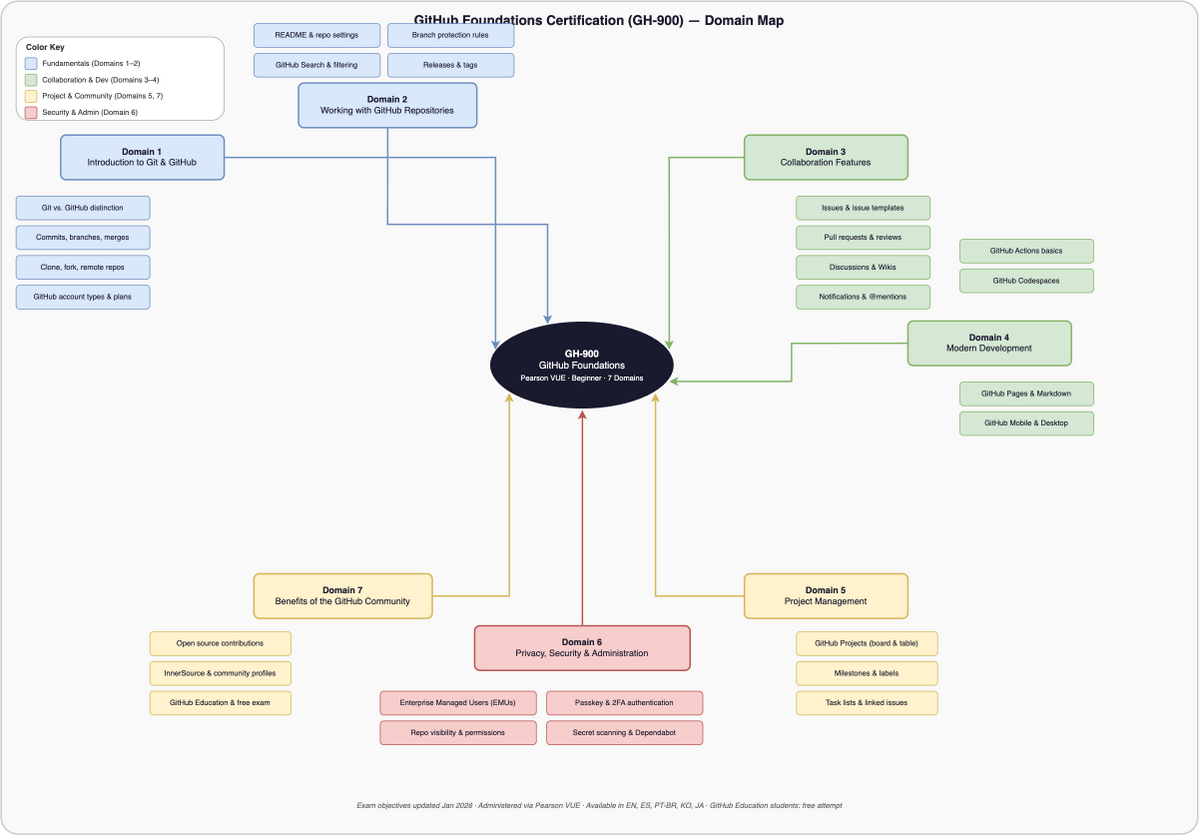
The official study guide publishes seven domains with percentage ranges. Those ranges are from the January 2026 revision, which GitHub describes as "significant." The numbers below reflect the official blueprint.
Domain 1, Understand Git and GitHub Basics (25–30%)
The largest domain and the one most candidates underestimate in terms of specificity. Version control concepts, the Git/GitHub distinction, repository basics, GitHub Flow, account types, and Markdown all live here. That sounds straightforward until the exam presents "GitHub is..." with four plausible answers that all describe things GitHub does.
The key distinction the exam hammers: Git is the distributed version control system (a local CLI tool). GitHub is the hosted platform built on Git that adds collaboration features. Commands like git commit, git push, and git branch are Git. Pull requests, Issues, and Actions are GitHub. Questions will offer distractors like "a version control system" as a description of GitHub, which describes Git, not GitHub.
Markdown appears more than candidates expect. Know the syntax cold: **bold**, *italic*, ~~strikethrough~~, ` for inline code, three backticks for fenced code blocks, - [ ] for task lists. The backslash escape trap shows up, one backslash before a character renders it literally. Tables support inline formatting but not headings or lists within cells.
Candidates consistently report that GitHub Desktop and Mobile are tested in more detail than they anticipated. Know what each client can and can't do. GitHub Desktop handles commit, push, pull, and branch management with a GUI. GitHub Mobile lets you manage issues, review PRs, and respond to notifications. Neither replaces the full web interface.
Domain 2, Work with GitHub Repositories (10–15%)
Lower weight but not skippable. Repository creation, key community health files, branching, cloning, and forking live here. The CODEOWNERS file is where this domain generates traps.
CODEOWNERS can live in three locations: .github/, the repo root, or docs/, in that order of precedence. It must be under 3 MB. Code owners must have write permission (read or triage is not enough). The file must be on the base branch of the pull request for review requests to trigger. Memorize those four constraints. Some candidates who found this domain easy in practice tests were tripped up by the write-access requirement specifically.
Fork versus clone versus template is this domain's other major trap area. Fork = a server-side copy under your account, retaining an upstream link to the original. Clone = a local copy on your machine via git clone. "Use this template" = creates a new repo without commit history and without an upstream link. The exam will describe a scenario ("you want to contribute to a project you can't push to") and you need the right word. That scenario is fork, not clone.
Domain 3, Collaborate Using GitHub (10–15%)
This domain covers the collaboration lifecycle: Issues, Pull Requests, Discussions, notifications, Gists, Wikis, and GitHub Pages. People who've written up their experience report that real-world GitHub use carries you a long way here, but the feature-distinction traps are still present.
Issues track actionable work (bugs, tasks, feature requests). Discussions are for open-ended conversation (announcements, ideas, polls, Q&A). The exam will describe a scenario involving an open-ended question with no single outcome, the right answer is Discussions, not Issues. You can convert a Discussion to an Issue. You can mark a comment as the answer in a Q&A discussion.
The closing keywords trap is one of the most-cited question types across pass reports: close, closes, closed, fix, fixes, fixed, resolve, resolves, resolved, all work, but only when the PR is merged into the default branch. A PR with Fixes #42 merged into a feature branch does nothing to issue #42. That distinction has appeared repeatedly and is worth reviewing until it's automatic.
GitHub Pages publishes a static website from a repo. Wiki is collaborative documentation within the repo UI. The trap: "host a public website for the project" points to Pages; "quick collaborative docs without a site build" points to Wiki. Gists are lightweight snippet repos. Secret gists are not private, anyone with the URL can view them. You can't convert a public gist back to secret.
Domain 4, Apply Modern Development Practices (10–15%)
This is where the memorization burden peaks. GitHub Actions, Copilot plan differences, and Codespaces all live here, and the exam tests specifics.
For Actions, know the hierarchy cold: event triggers a workflow, workflow contains jobs, job contains steps, step runs a command or action, one runner runs one job at a time. Jobs run in parallel by default; use needs to create dependencies. Steps run in sequence on the same runner. Workflows live in .github/workflows/. The exam asks about the hierarchy and about runner behavior specifically, the distractor swaps "runner executes steps" (wrong) with "runner executes jobs" (right).
The events list is the memorization trap. The pattern across pass reports is consistent: candidates who didn't study the full event taxonomy got caught by questions about which events trigger workflows. Repository activity events (push, pull_request, issues, release), scheduled triggers (cron), and manual/external triggers (workflow_dispatch, repository_dispatch) all appear.
Copilot plan differences changed with the January 2026 blueprint update. The exam now tests Individuals, Business, and Enterprise distinctions, not just Individuals vs Business. Business ($19/user/mo) adds centralized policy controls, IP indemnity, and no training on your code. Enterprise ($39/user/mo, requires Enterprise Cloud) adds an org knowledge base, PR summaries, and deeper GitHub.com integration. Copilot is not available for GitHub Enterprise Server and is not bundled into any GitHub plan, it's always a separate add-on.
Codespaces vs. the github.dev editor is another tricky pairing. Codespaces spins up a full cloud development environment with compute. The github.dev editor (press . in any repo) opens a lightweight VS Code in the browser but has no terminal and can't run code. Know when to recommend each.
Domain 5, Manage Projects with GitHub (5–10%)
Lowest weight alongside the Community domain, but the Projects versus Projects (classic) distinction generates consistent confusion. Projects (new) supports custom fields, multiple layouts (table, board, roadmap), and project insights. Projects (classic) is the older Kanban column-and-card system, being deprecated, and can link up to 25 repos. Questions mentioning "custom fields" or "roadmap layout" point to Projects (new). Questions mentioning "columns and cards" might be describing classic.
Labels, milestones, saved replies, and project workflows round out the domain. Saved replies are reusable comment templates, useful for streamlining frequent responses. Issue templates are Markdown starting points. Issue forms are structured YAML forms with defined input fields. Know the difference between all three.
Domain 6, Understand Privacy, Security, and Administration (10–15%)
This is the domain that catches developers off guard. The failure reports are consistent on this point: candidates who studied only their own developer workflows and skipped the administration section paid for it on exam day.
Authentication: 2FA, passkeys, Enterprise Managed Users (EMUs), and Single Sign-On (SSO). EMUs are user accounts provisioned and managed entirely by the enterprise through an identity provider, employees sign in with a managed identity, not a personal GitHub account. EMUs are an Enterprise Cloud feature. SSO lets organizations require identity provider authentication before accessing org resources.
The permission roles need memorization: Read (view/clone/discuss), Triage (manage issues and PRs without pushing, but cannot create, edit, or delete labels), Write (push code, merge PRs, manage labels), Maintain (manage repo settings without destructive actions, cannot delete the repo, change visibility, or delete issues), Admin (full control including destructive actions). Custom roles require Enterprise Cloud.
Security features follow a paid/free split that generates exam questions. Dependency graph and Dependabot alerts are free on all repos, public and private. Code scanning, secret scanning, and push protection are free on public repos by default. On private repos, those features require a paid Code Security or Secret Protection license (formerly bundled as GitHub Advanced Security). The trap question: "Which security feature is free on a private repo?" The answer is dependency graph and Dependabot alerts, not code scanning.
Branch protection rules, organization structure (orgs own repos, enterprise accounts manage multiple orgs, you never sign in to an org or enterprise directly), and the GitHub Free/Team/Enterprise plan differences all appear here too.
Domain 7, Explore the GitHub Community (5–10%)
Open-source workflows, InnerSource, GitHub Sponsors, licensing, and the Marketplace. Lighter weight but some candidates find the licensing wording tricky, edge cases around license terms appear as distractors.
The InnerSource distinction is reliably tested: applying open-source practices (transparency, PRs, shared repos) inside an organization (private to the company). "Open-source collaboration practices used internally and privately within a company" = InnerSource. The trap is answering "open source" for an internal scenario.
Stars, follows, and Achievements round out the community section. Stars bookmark and signal appreciation for repos (also a discoverability signal). Following users surfaces their activity in your feed. A discoverable repository has a clear README, a license, topics/description, and useful documentation.
The Failure Pattern
Four things account for most failures, and three of them involve underestimating specific content.
Treating "foundational" as "easy to skip." The Enterprise/administration content, EMUs, SSO, plan gating, permission roles, is legitimately complex. Candidates who came from a pure developer background and assumed this domain would be light consistently report it as their weakest area on exam day.
Passive-only study. Some candidates report watching video courses and doing nothing else. The conceptual distinctions (fork vs clone, Issues vs Discussions, Projects vs Projects classic) only solidify when you actually create repositories, open pull requests, and explore GitHub's settings. Passive study without hands-on time leads to failure at a higher rate than active study.
Ignoring the January 2026 blueprint update. The official study guide explicitly notes the exam "changed significantly" with new objectives, removed content, and reworded items. Pre-2026 study notes, even detailed community ones, may cover content that's been removed or miss content that's been added. Use the current official study guide as your domain checklist.
Technical exam environment issues. This is a practical failure mode, not a content one. Multiple candidates running online-proctored exams have reported that WSL (Windows Subsystem for Linux) causes technical failures, the proctor software flags it. Disable WSL before your exam appointment. Also verify the exam window is truly fullscreen before starting; at least one candidate had an issue here that required intervention.
How to Prepare
Start with the official learning path
The Microsoft Learn GitHub Foundations learning path (free at aka.ms/LearnGitHubPath) is the official starting point and covers every domain. It's dense and thorough, its main weakness is that it's easier than the real exam. Finishing it doesn't mean you're ready; it means you've seen the material.
GitHub Skills (skills.github.com) provides free interactive hands-on courses. Use it alongside the learning path to build the hands-on muscle memory the exam expects.
The official study guide at learn.microsoft.com/credentials/certifications/resources/study-guides/gh-900 is your domain checklist. Use it to verify you can speak to every bullet point before scheduling.
Build real things
Create a personal repository. Add a CODEOWNERS file and put it in the right location. Open a pull request with a closing keyword and verify you understand which branch it needs to merge into to close the issue. Set up a basic GitHub Actions workflow. Explore the Projects interface. Don't just read about these features, do them once, and the exam questions become concrete.
Practice exams are the gap-finder
Use CertCompanion (/exams/github-foundations-gh-900) as your primary practice exam tool. Target 80-plus percent before scheduling. The value isn't the score, it's finding the domains where you're consistently wrong. Those are the domains worth an extra review pass.
The official free practice assessment on Microsoft Learn is worth completing early, before you feel ready. The gaps you find in week two are cheaper to fix than the gaps you find on exam day.
Official exam tools worth using:
- Microsoft Learn free practice assessment (linked from the certification page)
- GitHub Skills interactive labs (skills.github.com)
- Official study guide as a domain checklist (learn.microsoft.com)
- Official exam registration (examregistration.github.com/certification/GHF)
Register using a personal Microsoft account, not an employer account. If your employment situation changes, you won't lose access to your credentials.
Cost per study hour
At $99 for the exam and roughly 20–30 hours of study for most candidates (more on those ranges below), the all-in cost per study hour works out to roughly $3–5, assuming you use free official resources and CertCompanion for practice. That's lower than almost any other certification at this level. The financial risk of a failed attempt is real ($99 per sit) but modest compared to associate-level cloud certifications. If you can consistently hit 80-plus percent on practice exams before booking, the per-attempt cost rarely compounds.
Study Hours by Background
| Background | Estimated hours | Notes |
|---|---|---|
| Experienced GitHub users (daily use, 2+ years) | Light review, ~1 week | Some candidates report finishing in 40 minutes, but don't skip the administration and Copilot plan material, which surprises people regardless of experience |
| Intermediate (some GitHub use, not daily) | 4–6 weeks combined study | Community reports suggest this group benefits most from combining the official learning path with structured practice exams |
| Beginners (limited Git/GitHub background) | ~30 hours total | Community-cited breakdown: ~20 hours theoretical, ~10 hours hands-on; a 7-week structured plan is available via the Microsoft Tech Community blog |
These figures are based on limited community data, treat them as orientation, not guarantees. The January 2026 blueprint revision means study time estimates from earlier posts may undercount the administration and modern development content.
On Exam Day
Disable WSL before starting if you're on Windows and running online-proctored. This is the most consistently reported technical issue and it can cause an exam failure that has nothing to do with your preparation.
Verify the exam window is fullscreen before you begin. The Pearson VUE proctor software requires it and at least one candidate had a disruptive issue because the window wasn't recognized as fullscreen.
The 100-minute window is more time than you need for the question count. Many candidates report finishing in 40–60 minutes. Use the extra time to review flagged questions, not to rush. The questions where two answers look right are exactly the ones worth spending an extra minute on.
Skip and return to difficult questions. The format rewards this, you're not penalized for moving on and coming back. Mark anything involving feature distinctions or plan tiers for review; those are the questions where a second read sometimes changes the answer.
Scores are typically available shortly after submission. Badges are issued via Credly, generally within 24–48 hours during US business hours.
What the Cert Actually Does for You
Frankly, GH-900 is an entry-level signal. It won't differentiate a mid-career engineer competing for senior roles. Community experience suggests it's most valuable for students and junior developers building out a portfolio, professionals transitioning from other version control systems, and developers in adjacent roles (PMs, support, technical writers) who want to formalize GitHub proficiency.
Microsoft Learn lists the cert as relevant for Administrators, App Makers, Developers, and DevOps Engineers. Job postings on Indeed reference it as a listed qualification. The credential's career impact grows when stacked, GH-900 makes a reasonable foundation for the GitHub Actions Certification and the GitHub Administration Certification (GH-100).
No salary data specific to this certification was available in any sourced material at time of writing. The broader pattern for foundational credentials: they contribute to overall profile strength but don't independently shift compensation in the way associate or professional cloud certifications do.
Renewal requirements are currently unsettled in the documentation. Community sources cite 2 or 3 years; the official Microsoft Learn framework points toward annual renewal. Verify in the GitHub Candidate Handbook before relying on any specific expiry window.
The cert is valid across the full GitHub product line, not tied to a specific employer account. Keep it in your personal Microsoft Learn profile.
Recent candidate threads
Real posts from people preparing for or recently sitting the GH-900. Read these for the unfiltered version of what the exam felt like:
- Practice Assessment FOR Gh900 Github Foundations, r/github · 60 comments
- Passed THE NEW Gh900 Github Foundations Exam, r/AzureCertification · 45 comments
- Passed THE Github Foundations Gh900 Exam Today, r/github · 16 comments
- Passed Gh900 NOT Even Close, r/AzureCertification · 13 comments
Threads pulled from the Reddit communities most active for GitHub certifications.
FAQ
Is the GitHub Foundations exam hard?
It depends heavily on your background. Experienced GitHub users find the content familiar but can still be caught by enterprise/administration questions they've never encountered. Beginners need to study both the concepts and the feature distinctions. The format is multiple choice, not scenario essays, but "multiple choice" doesn't mean "easy" when the questions are built around look-alike features.
How many hours of study does GH-900 require?
Community reports vary based on background. Beginners report around 30 hours (some data suggests roughly 20 theoretical and 10 hands-on). Intermediate users report 4–6 weeks with combined course and practice exam work. Experienced GitHub users report as little as a week of light review. These are rough estimates with limited sourcing, your mileage will vary based on how much administration and Copilot content is new to you.
Does GH-900 expire?
The validity period is genuinely unsettled. Community sources variously state 2 or 3 years; the official Microsoft Learn framework points toward annual renewal. Check the GitHub Candidate Handbook before your exam for the current answer.
Do I need any prerequisites?
None. GitHub describes GH-900 as a beginner-level certification with no formal prerequisites. That said, candidates with zero Git or GitHub experience will need to build foundational hands-on familiarity before the material clicks.
What's the passing score?
700 out of 1000, which is approximately 70%. GitHub confirms the 1000-point scale but doesn't publish the exact threshold publicly, the 700 figure aligns with community reports across recent sittings.
Can I retake the exam if I fail?
Yes. After a first failure, wait 24 hours before retaking. Subsequent retakes have escalating waiting periods. The maximum is 5 total attempts. You'll reschedule through Pearson VUE.
Is the cert worth it for career purposes?
For students and junior developers, yes, it's a meaningful portfolio signal at a reasonable cost. For senior developers, it matters primarily as a stepping stone to the GitHub Actions and Administration certifications, where the career signal is stronger. On its own, it won't shift compensation for experienced engineers.
What changed with the January 2026 blueprint update?
The official study guide describes it as a significant change: new objectives were added, some were removed, existing objectives moved to different functional groups, and all were reworded. Domain weights shifted from fixed percentages to ranges. Copilot content now explicitly includes Agent Mode, multi-model support, and the Individuals/Business/Enterprise distinction. Pre-2026 study guides are partially stale, use the current official study guide as your primary checklist.
GH-900 rewards people who know GitHub's feature map precisely, not people who know GitHub casually. The collaboration and repository domains are accessible with real-world experience; the administration, Copilot, and Actions content requires dedicated study regardless of your background. Build something real, find your gaps with practice exams, and cover the enterprise material even if it feels out of scope for a "beginner" cert. That's where the surprises come from.
Ready to find your gaps before exam day? Practice with full-length GH-900 mock exams on CertCompanion.